Managing a virtual environment is not always easy. A single business may have hundreds of virtual machines working together every day. Some run websites, while others run databases, apps, or important business tools. If one virtual machine stops working, many other systems may also be affected. Finding these connections by hand can take a lot of time.
This is where vRealize Infrastructure Navigator became very helpful. It gave IT teams a clear view of how their virtual machines and applications were connected. Instead of guessing what depended on what, they could see everything in one place. This helped them fix problems faster and avoid unexpected downtime.
Although VMware retired vRealize Infrastructure Navigator, many people still want to learn about it. Some companies still use older VMware environments, while others want to understand why VMware replaced it with newer tools. In this guide, you will learn what vRealize Infrastructure Navigator is, how it works, its main features, why businesses liked it, and why VMware decided to move on to modern solutions.
What Is vRealize Infrastructure Navigator?
vRealize Infrastructure Navigator, often called VIN, was a VMware tool that helped administrators understand the applications running inside virtual machines. It worked as an extension for VMware vCenter Server and gave users a better view of their virtual environment.
Many virtual machines work together to run a single business application. For example, a shopping website may have one virtual machine for the website, another for the application, and another for the database. If one machine fails, the whole service may stop working. vRealize Infrastructure Navigator showed these connections automatically.
One of the biggest advantages of vRealize Infrastructure Navigator was its agentless discovery. This means administrators did not need to install software inside every virtual machine. VIN simply connected to the VMware environment and discovered applications on its own. This saved time and reduced extra work for IT teams.
Because of these features, many businesses used vRealize Infrastructure Navigator for planning upgrades, moving workloads, fixing problems, and understanding how their applications worked together.
How vRealize Infrastructure Navigator Works
The way vRealize Infrastructure Navigator works is actually very simple. First, it is installed as a virtual appliance inside a VMware environment. After installation, it connects directly to VMware vCenter Server.
Once connected, VIN begins scanning virtual machines. It discovers operating systems, running services, applications, and network ports. It does all of this automatically without asking administrators to install extra software inside each virtual machine.
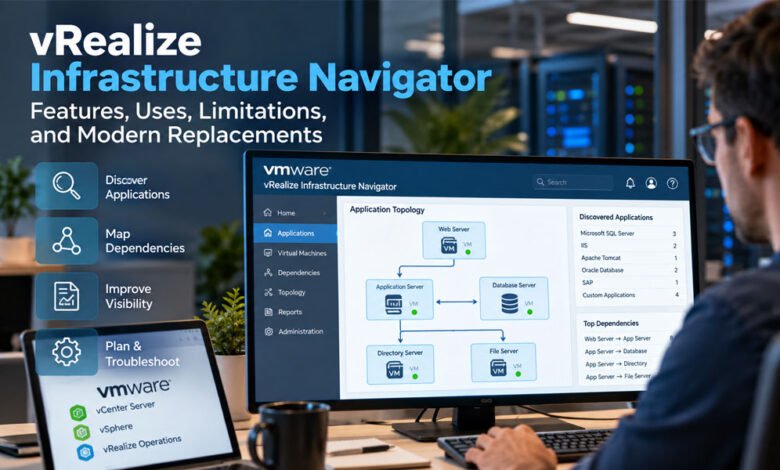
After collecting this information, vRealize Infrastructure Navigator builds an application dependency map. This map shows how different virtual machines communicate with one another. Instead of reading long reports, administrators can simply look at a visual map to understand the whole application.
Imagine a company website. One server hosts the website. Another server runs the business application. A third server stores customer data in a database. VIN can display these three servers together and show how they communicate. If someone plans to restart the database server, they immediately know which other systems will be affected.
The information also appears inside VMware vCenter, making it easy for administrators to see application relationships without opening another management tool. This simple workflow made vRealize Infrastructure Navigator a favorite tool for many VMware administrators.
Main Features of vRealize Infrastructure Navigator
One reason many companies trusted vRealize Infrastructure Navigator was its useful set of features. These features helped administrators understand complex virtual environments much faster than before.
The first major feature was automatic application discovery. VIN could identify many common applications running inside virtual machines, including Microsoft SQL Server, Oracle Database, IIS, Apache Tomcat, SAP, and many other TCP-based services. Everything was discovered automatically, saving many hours of manual work.
Another important feature was dependency mapping. Instead of simply listing virtual machines, VIN showed how they worked together. For example, it could display a Web Server connected to an Application Server, which then connected to a Database Server. It also showed the network ports used for communication, making troubleshooting much easier.
vRealize Infrastructure Navigator also provided real-time application visibility. As applications communicated with each other, administrators could see these relationships directly inside VMware vCenter. This helped them understand their environment without creating diagrams by hand.
Another useful feature was application grouping. Administrators could organize related virtual machines into business services. This made large environments much easier to manage because teams could view complete applications instead of individual virtual machines.
VIN also worked closely with other VMware products. It integrated with vCenter Server, vSphere Web Client, and vRealize Operations Manager. These integrations gave administrators a single place to monitor infrastructure and application relationships without switching between different tools.
These features made vRealize Infrastructure Navigator much more than a simple discovery tool. It became an important part of daily VMware management for many organizations.
Why Businesses Used vRealize Infrastructure Navigator
Businesses adopted vRealize Infrastructure Navigator because it solved real problems that every VMware administrator faced. Large virtual environments often contain hundreds of virtual machines, and keeping track of every application can become difficult. VIN made this job much easier.
One common use was troubleshooting. When an application stopped working, administrators could quickly view the dependency map and find the affected virtual machines. Instead of spending hours searching through logs and network settings, they could identify the problem much faster.
VIN also helped during server migrations and infrastructure upgrades. Before moving a virtual machine, administrators could check every application connected to it. This reduced the risk of unexpected downtime and made migration projects much safer.
Another important benefit was capacity planning. By understanding application relationships, businesses could make better decisions when adding resources or expanding their virtual infrastructure. It also improved documentation because administrators always had an up-to-date view of their application environment.
The tool was also valuable for disaster recovery planning. Since VIN showed every dependency between virtual machines, IT teams knew which systems needed to recover first after a failure. This helped businesses restore important services in the correct order and reduce service interruptions.
vRealize Infrastructure Navigator Integration with VMware
One of the best things about vRealize Infrastructure Navigator was how well it worked with other VMware products. It was not made to work alone. Instead, it became part of the VMware management system and gave administrators more useful information without changing the way they worked.
The main connection was with VMware vCenter Server. After VIN was installed, administrators could open vCenter and quickly see application details for each virtual machine. They did not need to switch between different programs. Everything was available in one place, which made daily work much easier.
Another important integration was with vSphere Web Client. This allowed users to view application maps, service details, and dependency information through a simple web interface. Instead of reading long reports, they could see visual maps that were much easier to understand.
vRealize Infrastructure Navigator also worked with vRealize Operations Manager. Together, these tools helped administrators understand both application relationships and system performance. This made it easier to find problems before they became serious and improved overall infrastructure management.
Benefits of vRealize Infrastructure Navigator
Many companies trusted vRealize Infrastructure Navigator because it saved both time and effort. Instead of creating application maps by hand, the software discovered everything automatically. This reduced mistakes and helped IT teams work faster.
Another big benefit was better visibility. Administrators could see how applications, databases, and virtual machines were connected. When someone planned a server update or migration, they already knew which systems would be affected. This reduced unexpected downtime.
The tool also improved troubleshooting. Imagine a website suddenly stops working. Without application maps, finding the cause could take hours. With vRealize Infrastructure Navigator, administrators could quickly follow the connections between servers and locate the problem much faster.
It also helped businesses with planning. Whether adding new servers, upgrading hardware, or preparing for disaster recovery, VIN provided useful information that made decisions easier. This helped companies keep their services running smoothly.
Why VMware Retired vRealize Infrastructure Navigator
Many people still ask why VMware decided to retire vRealize Infrastructure Navigator. The answer is simple. Technology changed, and businesses needed more powerful tools.
One reason was security. VIN depended on older VMware technology that became difficult to support safely. As VMware released newer versions of vSphere, keeping VIN updated became harder. Some older features could no longer meet modern security standards.
Another reason was compatibility. New VMware environments included cloud services, containers, and modern applications that VIN was never designed to manage. It worked very well for traditional virtual machines, but today’s IT environments are much larger and more complex.
VMware also changed its product strategy. Instead of offering many separate tools, it combined important features into newer platforms like VMware Aria Operations, VMware Aria Operations for Networks, and the Service Discovery Management Pack. These tools provide better monitoring, stronger analytics, and support for modern cloud environments.
Limitations of vRealize Infrastructure Navigator
Even though vRealize Infrastructure Navigator was a helpful product, it had several limits. As technology continued to improve, these limits became more noticeable.
The biggest limitation was its focus on traditional virtual machines. It did not fully support containers, Kubernetes, or many cloud services that businesses now use every day. This made it less useful for modern IT environments.
Another problem was that VIN stopped receiving updates after VMware retired it. Without regular improvements and security updates, businesses faced higher risks by continuing to use older software.
The tool also depended on older VMware interfaces that are no longer widely used. As VMware released newer management platforms, VIN slowly became outdated. Companies looking toward the future needed tools built for today’s hybrid and multi-cloud environments.
Best Modern Replacements for vRealize Infrastructure Navigator
Although vRealize Infrastructure Navigator is no longer available, several modern tools provide even more features. These products offer better visibility, stronger security, and support for today’s cloud-based environments.
VMware Aria Operations is one of the most popular choices. It helps monitor virtual machines, applications, and infrastructure from one dashboard. It also uses smart analytics to help administrators find problems faster.
Another excellent option is VMware Aria Operations for Networks. This tool focuses on network traffic, application connections, and security. It gives much deeper visibility than VIN and works well with modern VMware environments.
The Service Discovery Management Pack is another useful option for organizations already using VMware Aria Operations. It continues the idea of application discovery and dependency mapping without relying on the older VIN platform.
Businesses that use different virtualization platforms often choose SolarWinds Virtualization Manager. It supports VMware, Microsoft Hyper-V, and Nutanix AHV. It helps monitor performance, manage resources, and plan future capacity.
Another popular choice is Dynatrace. It provides full application monitoring, AI-powered problem detection, and support for cloud, containers, and hybrid environments. Many large companies choose Dynatrace because it automatically finds problems before users notice them.
VIN vs Modern Alternatives
If you compare vRealize Infrastructure Navigator with today’s tools, you can clearly see how technology has improved. VIN was designed mainly for VMware virtual machines, while modern products manage virtual machines, cloud platforms, containers, and networks together.
Modern tools also include artificial intelligence, automatic performance analysis, and advanced security monitoring. They can discover applications faster and provide much deeper insights than VIN ever could.
Still, this does not mean VIN was a poor product. During its time, it solved an important problem and helped many VMware administrators understand complex virtual environments. It simply belongs to an earlier generation of virtualization tools.
Should You Still Use vRealize Infrastructure Navigator?
Some companies still run older VMware systems where vRealize Infrastructure Navigator continues to work. If your environment has not changed much, VIN may still provide useful application maps.
However, using retired software always brings some risk. There are no new updates, no security improvements, and no support for modern workloads. Over time, these issues become more serious.
If your business plans to move to newer VMware versions, hybrid cloud services, or container platforms, migrating to a supported solution is the better choice. A careful migration plan will help reduce risk and improve long-term stability.
Before replacing VIN, review your current applications, understand your existing dependencies, train your team on the new platform, and test everything before making the final move. A gradual migration is usually the safest approach.
Bottom-Line
vRealize Infrastructure Navigator played an important role in VMware environments for many years. It gave administrators a simple way to discover applications, map dependencies, and better understand their virtual infrastructure. These features helped reduce downtime, improve troubleshooting, and make daily management much easier.
As technology changed, VMware introduced newer platforms that support cloud computing, containers, artificial intelligence, and hybrid environments. Because of these changes, vRealize Infrastructure Navigator reached the end of its life, but its ideas continue in modern VMware management tools.
If you still use older VMware systems, understanding how vRealize Infrastructure Navigator works can help you manage your environment more confidently. If you are planning for the future, modern tools like VMware Aria Operations, VMware Aria Operations for Networks, and other leading platforms provide better visibility, stronger security, and more advanced features for today’s IT world.
Choosing the right replacement depends on your business needs, your infrastructure, and your future plans. By understanding both VIN and its modern alternatives, you can make smarter decisions and keep your virtual environment secure, reliable, and ready for the years ahead.
(FAQs)
What is vRealize Infrastructure Navigator?
vRealize Infrastructure Navigator is a VMware tool that automatically discovers applications running inside virtual machines. It also shows how those applications are connected, making it easier to manage VMware environments.
Why did VMware retire vRealize Infrastructure Navigator?
VMware retired vRealize Infrastructure Navigator because it relied on older technology that could not support modern cloud platforms, containers, and newer VMware environments. VMware replaced it with more advanced management tools.
What are the best alternatives to vRealize Infrastructure Navigator?
Some of the best alternatives are VMware Aria Operations, VMware Aria Operations for Networks, Service Discovery Management Pack, SolarWinds Virtualization Manager, and Dynatrace. These tools offer better monitoring and support modern IT environments.
What was the biggest benefit of vRealize Infrastructure Navigator?
The biggest benefit of vRealize Infrastructure Navigator was automatic application discovery and dependency mapping. It helped administrators quickly understand how virtual machines and applications worked together.
Can you still use vRealize Infrastructure Navigator in 2026?
Some businesses still use vRealize Infrastructure Navigator with older VMware environments. However, because it no longer receives updates or support, moving to a modern replacement is the safer and better long-term choice.
For more similar articles, visit DebusTech


One Comment